How to Make a Family Recipe Book Everyone Can Use
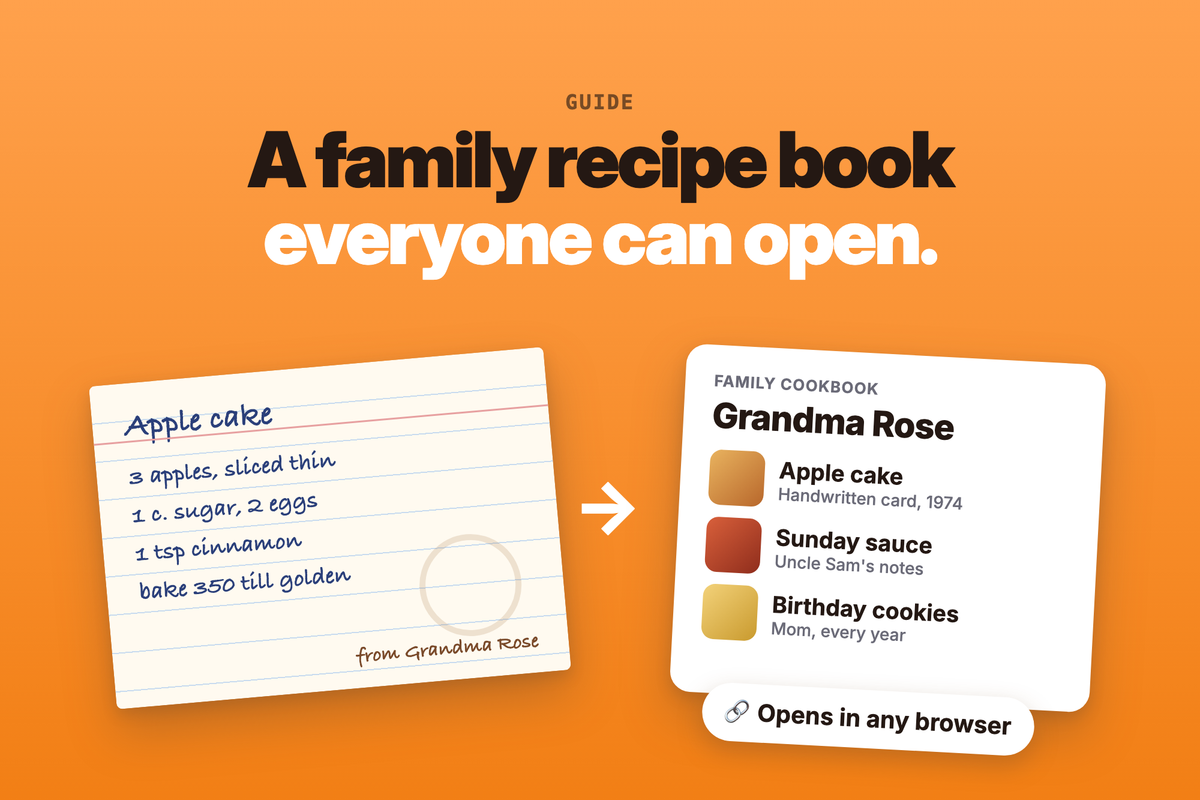
To make a family recipe book everyone can use, gather every recipe in one place, photograph the handwritten cards, sort the recipes into sections and share the book as one link that opens in any browser. Credit each recipe to the cook it came from, keep the original cards safe, and print a copy later if your family wants one on the shelf.
Every family has a drawer like it: a shoebox of index cards, a page torn from a magazine, an aunt's lasagna written on the back of an envelope. Someone asks for the stuffing recipe every November, and the one person who knows where the card is happens to be busy at the stove. A family recipe book fixes that, as long as it lives somewhere everyone can reach.
Gather the Recipes First
Before you choose an app or a printer, find out what you have. Family recipes turn up in more places than you expect:
- Cards and notebooks: recipe boxes, a parent's spiral notebook, notes in the margins of an old cookbook.
- Messages and emails: the recipe your brother texted you, a photo of a card someone sent to the family chat.
- Links: the blog recipe your family has made every summer for ten years. Keep the link and the cook's name with it, so the person who wrote it gets the credit.
- Recipes nobody wrote down: the ones a grandparent makes from memory. Ask to cook them together, and write down what actually goes in. When they say "a handful", measure the handful.
Ask relatives to send what they have to one person, so there is a single pile to work from. A free shared document makes this easy. Start a Google Doc, share it with the family, and let each person add their recipes to it.
For each recipe, note who it came from and anything they told you about it. That note is often the part of a family recipe book people read first.
Digitize the Handwritten Cards
A phone camera is enough. For photos you can read years from now:
- Shoot in daylight, with the card flat on a plain surface and the phone held straight above it.
- Fill the frame with the card, and take one photo per card. Photograph the back too, because that is where the notes tend to be.
- Check every photo before you put the card away. Blur is easy to miss on a small screen.
Then turn each photo into a recipe you can search and cook from. You can type it out yourself, or use an app that reads photos, including handwriting. ChefTalk can do this: take a photo of a handwritten card or a cookbook page, and it becomes a recipe in the app.
Whichever way you choose, check the result against the card. Handwriting is where small mistakes creep in. A small t read as a capital T turns a teaspoon of salt into a tablespoon. Keep the cook's own amounts and words. The book should hold the recipe the way they made it, not a new version of it.
If a grandparent wrote the recipe in another language, translate the words and leave the amounts exactly as they wrote them. ChefTalk translates a recipe into English for free when you import it. We wrote more about cooking from recipes in another language in Lost in Translation? Not in Your Kitchen.
Organize It So People Can Find Things
A family recipe book is only useful if people can find tonight's dinner in it. Pick sections that match how your family cooks and asks for recipes:
- By cook: Grandma Rose, Uncle Sam, Mom. This is often how relatives remember a dish.
- By occasion: birthdays, the holidays, summer at the lake.
- By course: soups, mains, baking.
In a Google Doc, give each section its own heading. In ChefTalk, each section is a cookbook. Cookbooks are free, you can make as many as you like, and one recipe can sit in several. So the birthday cake can live under both Grandma Rose and Birthdays.
Add a short note to each recipe: who made it, when the family eats it, and any trick that never made it onto the card.
Share It So Everyone Can Open It
The point of the book is that everyone can use it, including the relative who will never install an app. The easiest way to do that is a link that opens as a normal web page.
A Google Doc can do this for free. Set sharing to "Anyone with the link", and Google's help page says people can open it without signing in. It works well for a small book. Once it grows past a few dozen recipes, it becomes one long scroll on a phone.
ChefTalk gives you two free ways to share:
- A link to a recipe or a whole cookbook. A relative who has ChefTalk adds their own copy in one tap. Anyone without the app sees the full recipe on a web page.
- My page. One address, like cheftalk.app/@yourname, that shows only the cookbooks and recipes you choose. Anyone can open it in a browser, and it stays up to date as you add recipes.
ChefTalk runs on iPhone and iPad only. Relatives on Android or a computer can still open your shared links and your page in a browser.
Cook From It
A family recipe book is for cooking, not only for keeping. Family recipes are often short. The card says "bake until done" because the cook knew what done looked like.
ChefTalk is built for the cooking part. It talks you through the recipe while you cook, action by action, without waiting to be asked. It sets the timers for you. You can ask it questions about the step you're on, and it tells you what to look, smell and listen for. It also gives kitchen safety tips. The free plan includes one guided cooking session a month, and Premium gives you as many as you want.
Family recipes are also the opposite of recipes written by AI. Every recipe in your book is a real recipe, cooked by real people, often for years. A recipe written by AI has never been cooked by anyone, which is why ChefTalk never writes recipes with AI.
Keep the Original Cards Safe
Once a card is photographed, cook from the photo and put the card away. The Library of Congress recommends storing paper in acid- and lignin-free folders and boxes, somewhere cool, dry and out of direct light. It also says to avoid attics, basements, rubber bands, tape and paper clips.
Keep the cards out of the kitchen, where splashes and steam do the most harm. And keep a second copy of the photos somewhere other than your phone.
Print a Copy for the Shelf
If you want a printed copy for the holidays or as a gift, the work you have done makes it much easier. Every recipe is already typed, checked and sorted.
Print services can turn it into a real book. Create My Cookbook has a free designer, lets you invite family to add recipes, and has no minimum order. The Family Cookbook Project says you can "start free" and "pay only when you print", with spiral, hardcover and perfect-bound options. Inviting family to add recipes there takes its full membership. Both price a book by its pages and binding, and show you a quote before you order. ChefTalk doesn't make printed books, so this part happens elsewhere.
Before you print, check every recipe against its card one last time. Add a photo of the original card next to the typed version. And order a single copy before you order twenty.
Questions People Ask
How do I make a family cookbook for free?
Collect the recipes in a free tool and share them as one link. Printing is the only part that costs money.
- A Google Doc: free, and anyone with the link can open it.
- ChefTalk: free to import recipes from links, sort them into cookbooks and share them. Photo import of handwritten cards is Premium.
- A print service: free to design the book. You pay when you print.
How do I digitize old recipe cards?
Photograph each card flat, in daylight, front and back. Then type it out or use an app that reads handwriting, and check the result against the card.
What should a family recipe book include?
Each recipe, the name of the cook it came from, a short note about when the family makes it, and ideally a photo of the original card. The notes are what make it a family book rather than a recipe list.
Can relatives use a family recipe book without downloading an app?
Yes, if you share it as a link that opens as a web page.
- A Google Doc: set sharing to "Anyone with the link".
- ChefTalk: a shared recipe or cookbook opens as a web page, and so does My page.
- A printed copy: for the relative who would rather hold a book.
How do I keep handwritten recipe cards from fading?
Store them flat in acid- and lignin-free folders or boxes, somewhere cool, dry and dark, away from attics and basements. Handle them as little as possible once they are photographed.
Which family recipe goes in first? Try ChefTalk free on the App Store.
At ChefTalk, we're building a voice-first cooking companion that transforms any recipe into hands-free guidance, action by action. Learn more.